

Choosing a payment solution for Dynamics 365 Business Central starts with accepting payments, but it shouldn’t end there. The right solution should also help your team manage follow-up, reduce manual work, and give customers an easier way to manage their accounts.
iPayments and Red Maple both offer payment capabilities for Business Central. To determine the best fit for your organization, there are key areas to consider including current invoice volume, bottlenecks in accounts receivable, time consuming tasks, and anticipated business and AR growth.
What Is the Difference Between iPayments and Red Maple for Business Central?
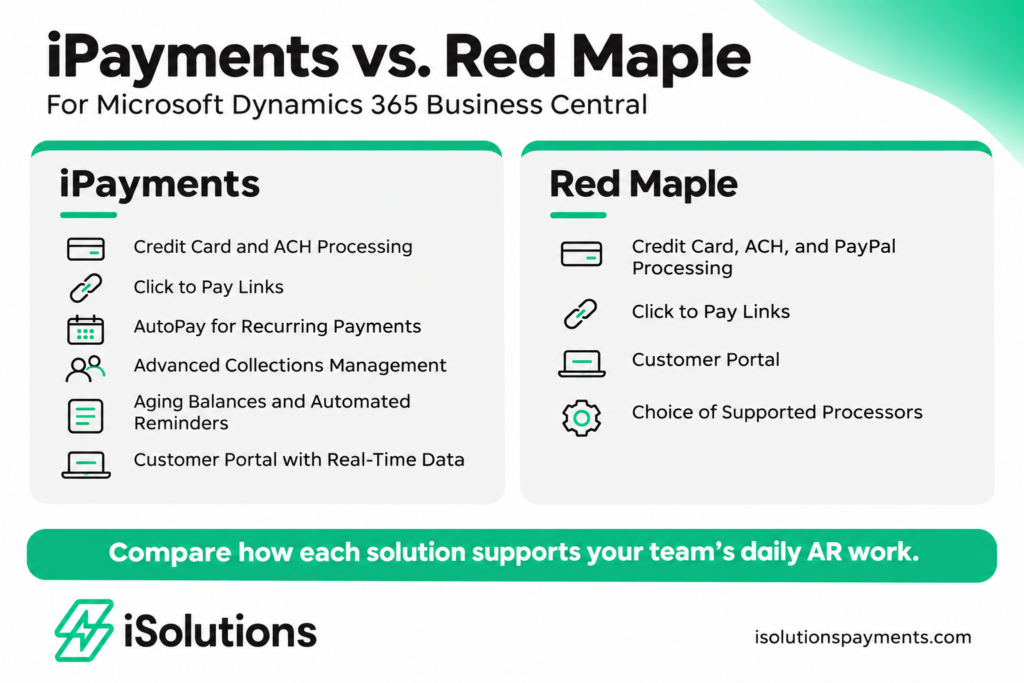
Red Maple offers payment processing for Business Central and a customer self-service portal. Its offerings include credit card and ACH payments, click-to-pay links, and portal payment options that include PayPal. Businesses can also choose to bring their own payment processor if it is included in their list of approved processors.
iPayments offers payment processing through convenient click to pay links that accept both credit card and ACH. Customers can use AutoPay to schedule recurring payments, Advanced Collections Management to streamline and automate collections, and a Customer Portal surfacing real-time data to users directly from data in Business Central.
While Red Maple allows for online payments, iPayments goes beyond simple credit card and ACH processing to streamline and automate the entire accounts receivable workflow.
Product Updates and Business Central Focus
|
|
Red Maple |
iPayments |
| Product Focus | Business Central | Business Central |
| Product Updates | Release notes are not readily available.
As of 11/2/2026, the latest version release documented in Microsoft Marketplace is 9/24/2026.
|
Monthly updates with new features and enhancements. Release notes can be found on the iSolutions website.
As of 11/2/2026, the latest version release documented in Microsoft Marketplace is 11/2/2026. |
| Microsoft Marketplace Rating | No ratings or reviews | 5.0 Rating with 45 reviews |
| G2 Rating | Not listed on G2
|
4.8 Rating with 46 reviews |
Who Is Red Maple Best Suited For?
Red Maple may be a good fit for Business Central organizations that have basic payment needs requiring click to pay links and are not able to change their current payment processor. While switching payment processors is not a complicated process, new businesses without financial history, companies with large chargebacks, or those in a high risk industry may have challenges getting approved for a merchant application. Those types of organizations may want to keep their current processor for a period of time, making Red Maple a viable option.
Businesses considering Red Maple should also review how their AR team will manage collections beyond accepting payments. While Red Maple does provide payment capabilities and a customer portal, there is no automation built in for ongoing collections management.
Who Is iPayments Best Suited For?
iPayments is a strong fit for organizations that want to reduce the administrative work involved in accounts receivable within Business Central.
It is particularly relevant for teams that:
- Manage a high volume of invoices and customer follow-up.
- Need recurring payments or future payment schedules.
- Want consistent collections plans across customer accounts.
- Track overdue balances, collection notes, and promises to pay.
- Receive frequent requests for invoices, account information, or shipment updates.
Teams That Spend Too Much Time Following Up
For those teams that spend time following up on unpaid invoices, tracking which customers regularly pay late, or searching for missing cash, having a solution that provides automated collections is vital.
iPayments includes automated collections plans, sends customized reminders, and allows you to review aging balances by due date, posting date, or document date. Users can assign collectors, record customer interactions, and track promises to pay within Business Central.
As invoice volume grows, this automation can easily help save countless hours, or even additional headcount, while speeding up collections.
Businesses With Recurring or Scheduled Payments
Organizations that offer subscriptions, annual fee plans, or any other recurring or scheduled payments can benefit from offering AutoPay to their customers, ensuring invoices are paid on schedule and customers don’t have to worry about making recurring payments.
In iPayments, teams can create reusable templates, assign them to customers, and have payments automatically processed and applied in Business Central.
Red Maple’s Business Central FAQ states that recurring credit card payments are on its roadmap.
Organizations That Want Broader Customer Self-Service
Self-service portals have become commonplace and most customers expect businesses to offer a way for them to view their account information and make payments or place orders online.
With iPayments Customer Portal, users can view and pay invoices, access account history, make partial payments, and view quotes, orders, and shipments, including tracking information. Customers can also submit document disputes and send invoice-related messages directly to Business Central, where BC users can reply.
For organizations handling frequent billing questions and document requests, these capabilities give customers more ways to find answers independently.
Which Solution Is Right for Your Business?
The right solution depends on your business needs now and in the future. If you don’t process a large volume of invoices, need to bring your own processor, or don’t see your invoice or collections management growing, Red Maple is worth evaluating.
iPayments is worth evaluating when your organization wants payment processing alongside embedded collections management, flexible payment automation, and a customer portal that supports more than invoice payments.
Start with the tasks consuming the most time for your AR team. Then evaluate how those are resolved within any solution you consider.
Want to see how iPayments supports your AR workflow? Schedule a demo with iSolutions to explore payments, collections management, AutoPay, and customer self-service in Business Central.
Schedule a Demo