

Manage Subscription or Recurring Billing
AutoPay
Automate recurring billing, scheduled payments, and balance-due collections with AutoPay. AutoPay helps reduce manual work, improves cash flow, and makes paying invoices effortless.
Automate recurring payments, subscription billing, and balance-due collections without the manual work. Chasing payments, processing recurring invoices, and manually charging customer payment methods can consume valuable time and delay cash flow.
With AutoPay from iSolutions, you can automatically collect payments on the schedule you define while providing a seamless experience for your customers.
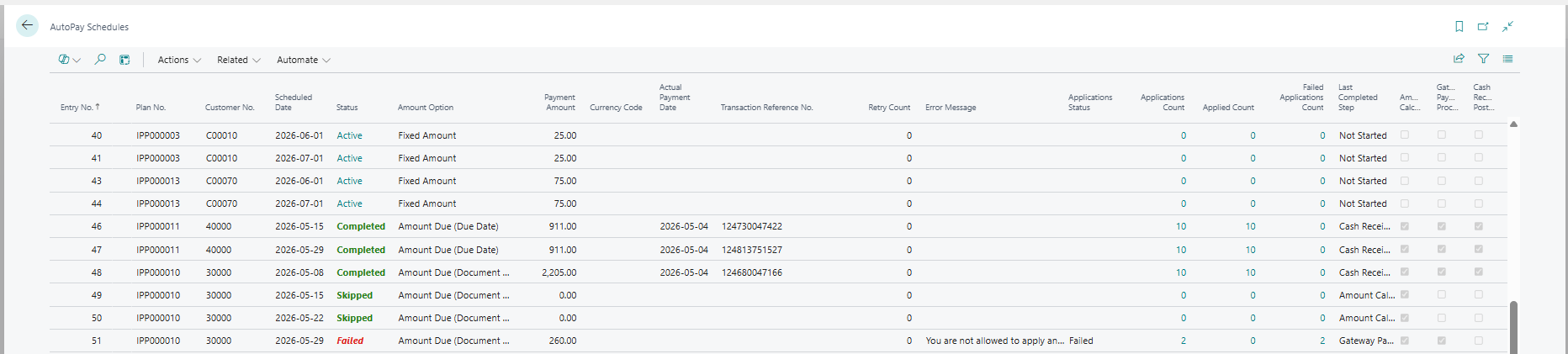
Create reusable payment templates for one-time future payments, recurring billing schedules, or automatic balance collections and assign them directly to customers. Once configured, payments are processed automatically and applied within Dynamics 365 Business Central.

AutoPay is included in the iPayments solution, helping finance teams reduce administrative effort, improve cash flow, and get paid on time.
Why AutoPay?
Automate recurring billing and subscription payments
Eliminate manual payment processing with automated recurring billing schedules that run automatically.
Schedule future customer payments
Create one-time future payments or recurring payment plans and automatically collect payments on the date you choose.
Reduce overdue invoices and improve cash flow
Automatically collect customer balances to lower days sales outstanding (DSO) and accelerate cash collections.
Offer flexible AutoPay options
Support recurring billing, installment plans, subscription payments, and automatic balance-due collections from a single platform.
Save time for AR and finance teams
Reduce manual payment entry, customer follow-up, and recurring billing administration with payment automation.
Secure ACH and credit card payments
Process recurring ACH and credit card payments through a secure, PCI-compliant payment infrastructure integrated with Dynamics 365 Business Central.
Features and Functionality
AutoPay is included in iPayments Basic and Advanced for Dynamics 365 Business Central.
Recurring Billing Automation
Automatically process recurring customer payments on a daily, weekly, monthly, quarterly, annual, or custom schedules.
Schedule Future Payments
Schedule payments to run automatically on future dates.
Balance Due Collections
Automatically collect a customer’s outstanding balance on a predefined and agreed upon schedule.
Reusable Payment Templates
Create standardized payment plans and assign them to one or multiple customers.
Stored Payment Methods
Securely save customer payment information using tokenization for future automated payments.
Automatic Payment Processing + Application
Payments run automatically and are applied to invoices in Business Central without manual intervention from AR staff.
Trusted by Over 600 Clients













Frequently Asked Questions
Does Dynamics 365 Business Central include AutoPay?
No. Dynamics 365 Business Central does not include native AutoPay functionality. AutoPay is available through iPayments and enables businesses to automate recurring billing, future payments, subscription payments, and balance-due collections directly within Business Central.
What types of payments can I automate with AutoPay?
AutoPay supports one-time future payments, recurring billing schedules, subscription payments, installment plans, and automatic balance-due collections. You can create payment schedules based on your business requirements and assign them directly to customers.
Can customers pay using ACH or credit cards?
Yes. AutoPay supports both ACH and credit card payments, giving customers flexibility in how they pay. Businesses can choose the payment methods they want to accept and securely store payment information for future automated transactions.
How often can recurring payments be scheduled?
AutoPay supports flexible payment schedules, including weekly, bi-weekly, monthly, quarterly, annually, or custom intervals. You can create reusable templates and apply them to multiple customers or configure unique schedules for individual accounts.
Are payments automatically applied in Dynamics 365 Business Central?
Yes. Payments processed through AutoPay are automatically recorded and applied within Dynamics 365 Business Central, eliminating manual payment entry and reducing reconciliation effort for finance and AR teams.
Is AutoPay secure?
Absolutely. AutoPay uses secure payment tokenization and PCI-compliant payment processing to protect customer payment information.
Sensitive card and banking details are never stored directly in Business Central, helping organizations maintain security and compliance.