There is a key gap in Dynamics 365 Business Central for any company that accepts payments and without an add-on solution, those organizations are left manually reconciling checks or payment information from other systems to Business Central.
Choosing the right add-on solution to fill that gap is about more than simply being able to accept credit card or ACH payments. The right solution should help your team follow up on overdue invoices, reduce the number of customer questions you field, allow for recurring payments, and provide the ability to automatically keep account information accurate.
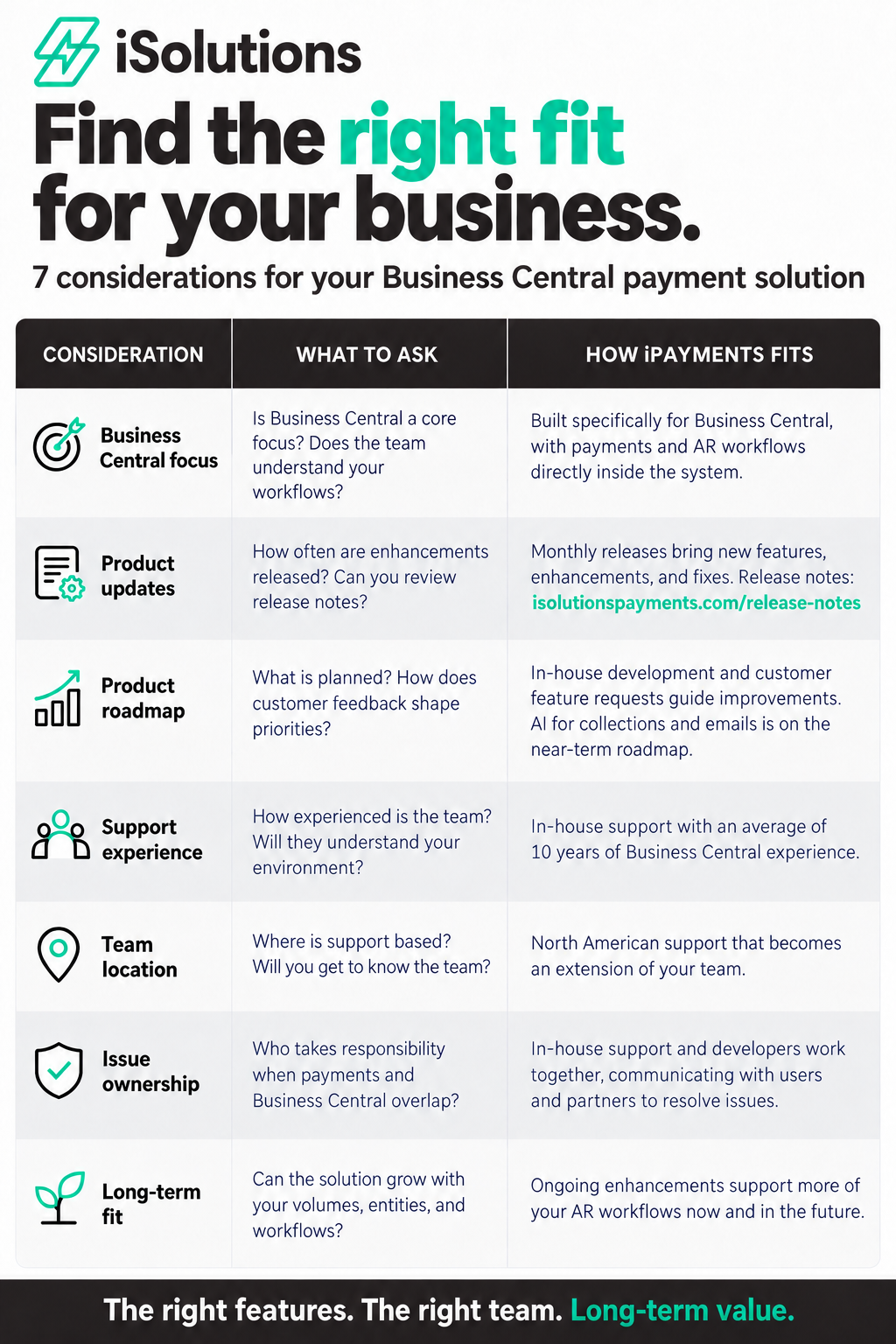
Two of the leading solutions for payments and AR automation are iPayments (from iSolutions) and EBizCharge. The feature list for each solution is below – but beyond the features, consideration should extend to how each solution can support and speed up your current processes. Here’s some key areas to compare and where each solution may fit (or not fit) your business.
Functionality at a Glance
All functionality listed below is included in both iPayments and EBizCharge’s applications. Any discrepancies in functionality are listed.
Payment processing in Business Central
| Credit card and ACH payments | In-person payments | Supported payment methods – Visa, Mastercard, AmEx, Discover, debit, ACH |
| Payment management inside Business Central – Authorize, capture, void, and refund | Automatic payment posting applies payments to invoices and updates the GL | Batch preauthorize sales orders tied to warehouse shipments |
| Surcharging |
iPayments supports payment processing on invoices and sales documents, with the ability to automatically convert quotes into orders for payment. EBizCharge supports payment processing on invoices and sales orders.
For in-person payments, iPayments integrates with Clover payment terminals, while EBizCharge uses its supported EMV terminals.
Customer payments and reminders
| Secure payment links emailed from BC | Branded customer payment portal | “Pay Now” buttons on invoices and sales orders |
| Payment reminders | Failed payment retries |
Failed payment retries are automatic within EBizCharge. Within iPayments, scheduled payments that fail are reprocessed, but when a payment declines it does not auto retry but instead alerts you to the payment failure.
Payment automation and administration
| Batch payments for multiple customers in one action | Automatic balance payments | Bulk payment requests |
| Automated G/L posting with zero manual reconciliation | Multiple merchant accounts | Role-based access |
Saved payment methods and security
| Saved payment methods | Secure payment information requests | Off-server card storage |
| Payment data protection through tokenization and encryption | Expiring payment method alerts |
Product updates and Business Central focus
| EBizCharge | iPayments | |
|---|---|---|
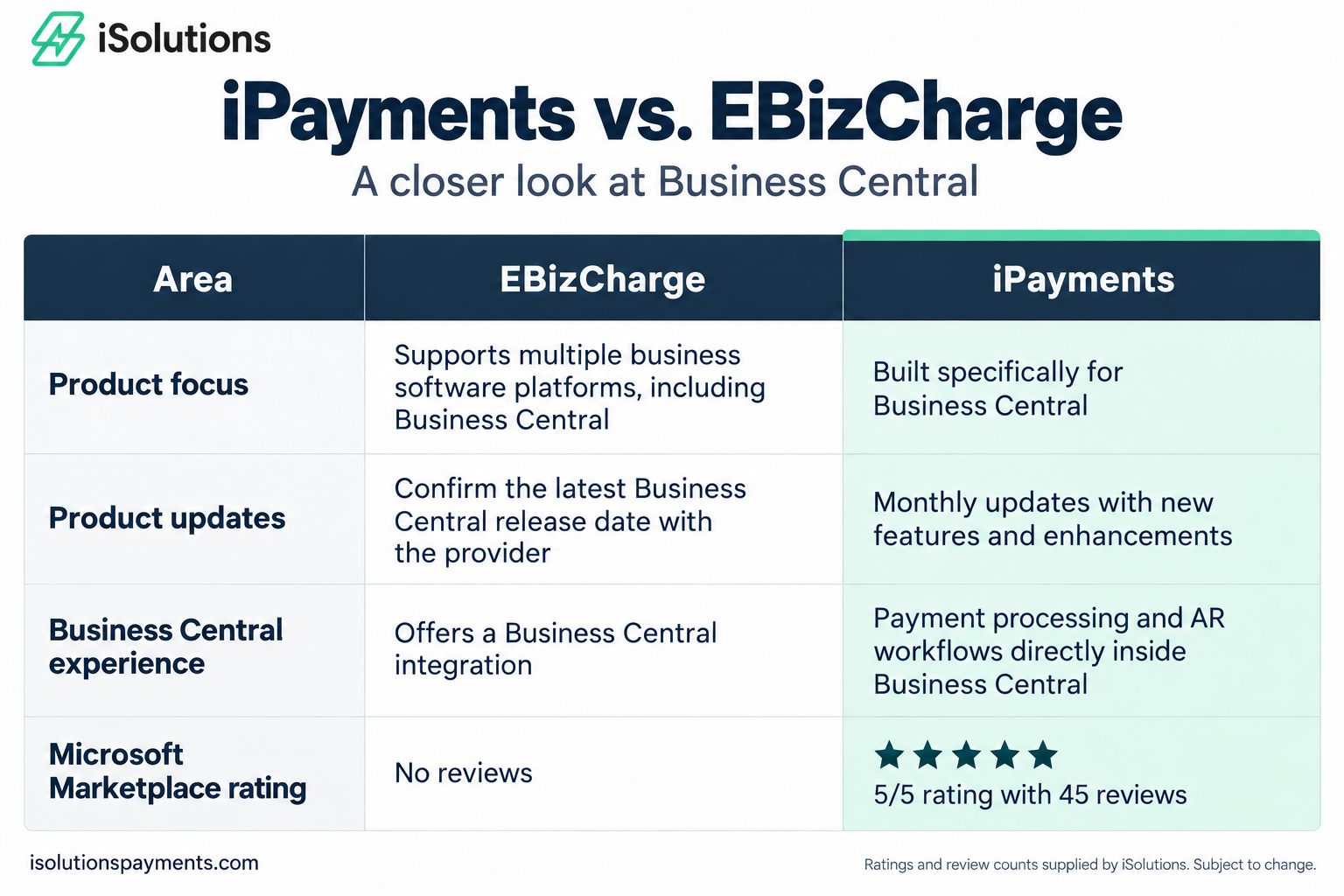
| Product focus | Supports multiple business software platforms, including Business Central | Built specifically for Business Central. |
| Product updates | Confirm the latest Business Central release date with the provider. As of 11/2/2026, the latest version release documented in Microsoft Marketplace is 4/24/2025. EBizCharge requires a per-tenant extension (PTE) that must be manually uploaded to your Business Central environment. Updates aren’t managed through Microsoft’s Marketplace. You need to email EBizCharge to request an updated file and install it manually. | Monthly updates with new features and enhancements. As of 11/2/2026, the latest version release documented in Microsoft Marketplace is 11/2/2026. iPayments updates are managed through the Business Central Admin Center, with no need to request and manually upload a new app file. |
| Business Central experience | Offers a Business Central integration through a data warehouse model. | Payment processing and AR workflows directly inside Business Central. All data is in real-time. |
| Microsoft Marketplace Rating | No reviews | 5/5 Rating with 45 reviews |
Process payments where your team already works
While both solutions offer similar functionality, there are key indicators in which may be the right solution for you and those all tie back to your accounts receivable processes.
Here are common scenarios and how iPayments fits:
| Payment scenario | How iPayments fits |
|---|---|
| Field service payments | Send a secure payment link so customers can pay from their phone without calling your office or sharing card details with a technician. |
| Point of sale / card-present transactions | Accept in-person payments using a connected Clover device for counter sales and customer pickups. |
| Order deposits | Collect an upfront payment against a sales order before fulfilling the order. |
| Partial payments | Let customers pay part of an invoice through the Customer Portal and leave the remaining balance open. |
| Invoice payments | Accept credit card and ACH payments inside Business Central or let customers pay through a secure link or Customer Portal. Pass along credit card surcharge fees to all customers, or to specific customers you designate. |
| Refunds | Process refunds directly inside Business Central. |
| Payments before an invoice exists | Receive payments against a customer account or sales order before an invoice is available. |
| Payments at shipment | Preauthorize a card on a sales order and capture payment as part of the fulfillment workflow. |
| Recurring payments | Set up recurring payment schedules to reduce manual processing for repeat charges. |
| Future-dated payments | Schedule a one-time payment for a future date using AutoPay. |
| Automatic balance payments | Use AutoPay to collect balances automatically based on the customer’s configuration. |
| Multiple invoices in one payment | Let customers select and pay multiple invoices through the Customer Portal. |
| Payments using saved methods | Securely save a payment method for future transactions without storing card data in Business Central. |
| Overdue invoice collections | Use Advanced Collections to send reminders and payment links that give customers a direct path to payment. |
| Parent company paying for multiple accounts | Use National Accounts to manage parent-child relationships and payments across related customer accounts. |
| Online purchases | Support e-commerce payment workflows, including the Commercebuild integration. |
A Practical Way to Manage Collections
Managing collections is historically a very manual process for many organizations. Determining when to reach out, documenting the last time you requested payment, figuring out historical trends for who does and does not pay, reviewing previous conversations and promises to pay, answering questions – it all takes time.
Being able to automate collections is key for growing or large businesses that inherently struggle with collections management.
Within iPayments, the Advanced Collections module provides the capabilities needed not only to speed up collections, but automate the process for less hands-on time from team members.
Many organizations are wondering how AI can help collections as well. The Advanced Collections module of iPayments will be rolling out AI functionality in late 2026 that will help to automatically write emails, saving time setting up communication workstreams.
| Collections capability | How iPayments fits |
|---|---|
| Different follow-up plans for different customers | Assign collection plans with reminder timing and follow-up schedules tailored to different customers. |
| Account notes and invoice questions | Review customer notes and document disputes within Business Central to understand previous conversations and issues affecting payment. |
| Identify customers who need a call | Use Collection Manager to review overdue accounts and prioritize outreach based on balances, aging, notes, disputes, and previous collection activity. |
| Follow up on unanswered reminders | Continue automated follow-ups according to the collection plan. Your team can review the account, contact the customer, and document the conversation to guide the next step. |
| Automatic communications | Schedule automatic email reminders that are sent with increasing urgency until the payment is made. With AI functionality (coming in late 2026), emails are automatically written for evaluation prior to scheduling. |
Customer Self Service
A Customer Portal is one of the most requested features among Business Central users, giving customers easy access to account information, online payments, and shipment details. For businesses, it means faster payments and fewer routine questions for the AR team. It can also encourage repeat sales by helping customers review past purchases, plan future orders, and know when it’s time to reorder.
The iPayments Customer Portal, included in iPayments Advanced, lets customers:
- View and pay open invoices.
- Review invoice and payment history.
- Pay multiple invoices in one transaction.
- Make partial payments and apply open credit memos.
- Access quotes, orders, and shipment information.
- Save credit card and ACH payment methods.
- Submit invoice comments and disputes that your team can address in Business Central.
- Request a Magic Link for passwordless access.
The iSolutions Customer Portal displays real-time Business Central data. Some customers who switched from EBizCharge have reported that their previous portal did not consistently reflect current account information.
Invest in the Solution that Fits Now and Will Grow With You
Price matters, but the real value comes from how much time a solution saves, how well it serves your customers, how quickly it helps you get paid, and whether it can grow with your business. If it creates more work and frustration than it solves, a lower price can end up costing you more.
A lower upfront cost can lose its advantage if your team spends more time on manual work, troubleshooting, or waiting for help. Compare what each solution will cost and what it will help your business accomplish over time.
When to Consider iPayments over EBizCharge
Consider iPayments if you want to bring more of your accounts receivable work into Business Central. From collecting payments and following up on overdue invoices to giving customers access to their account information, iPayments can help automate your AR work.
iPayments is a strong fit if your priorities include:
- Accelerating payments with click to pay links automatically embedded into invoices, emails, and accessible through the customer portal.
- Managing collections inside Business Central. Give your AR team a way to organize follow-up, schedule reminders, and manage overdue balances within the system they already use.
- Reducing routine customer requests. Let customers access invoices, payment history, quotes, orders, and shipment information through the Customer Portal, reducing the time your team spends resending documents or answering account questions.
- Keeping invoice communication connected to your accounting team. Customers can raise invoice questions or disputes through the portal, with messages available directly in Business Central for your team to review and respond.
- Automating repeat payment tasks. Use scheduled payments, recurring payments, and balance-due automation to reduce manual processing and make collections more consistent.
- Supporting more of the customer relationship. Give customers visibility into past purchases and open sales documents so they can plan their next order and check shipment details without contacting your team.
The iPayments Advanced package combines the Customer Portal with payment processing, Advanced Collections, AutoPay, reconciliation, and other iPayments capabilities. For businesses spending too much time moving between payment tasks, customer questions, and collections follow-up, that broader coverage can make iPayments a compelling choice.
When to Consider EBizCharge over iPayments
Include EBizCharge in your evaluation if mobile collection or payment integrations across several business systems are central requirements.
Still deciding which is the best solution for your organization?
Start with case studies and reviews to learn what other Business Central users like, and where they’ve experienced challenges, with each solution.
Schedule a demo with each provider to get your questions answered. Consider how quickly they respond, whether their availability fits your schedule, and how their implementation timeline aligns with your goals.
During each demo, ask the provider to walk through your workflows, including invoices, customer payments, exceptions, and accounting requirements. Compare how each solution handles those tasks and how much manual work remains for your team.
See How iPayments Handles Your AR Workflows
Bring us a task your team wants to spend less time on: following up on overdue invoices, taking payments over the phone, answering account questions, or managing recurring charges.
We’ll walk through that workflow in Business Central and explain the features, configuration, and costs involved.
Comparison reviewed October 30, 2026. Product capabilities and commercial terms may change.