
Managing customers paying by credit cards shouldn’t be manual, time consuming, or require multiple systems. iPayments for Dynamics 365 Finance and Supply Chain Management (formerly Finance and Operations), organizations can simplify the payment lifecycle from invoice delivery and online payments to credit card processing, payment authorization, and automatic payment posting.
One of the easiest ways to get paid faster is by making it simple for customers to submit payments.
Click-to-Pay Links on Customer Invoices in Dynamics 365 Finance
With iPayments, a Click-to-Pay link can be included directly on customer invoices generated in Dynamics 365 Finance. When customers receive the invoice, they simply select the payment link to access a secure payment page.
In the video, you’ll see the click to pay link as a hyperlink. You can set up your D365 Finance environment to display the link as a button or other icon.
When customers access the link, it brings them to a payment page, allowing them to enter their payment information and submit payment online without needing to contact your accounting team. iPayments is embedded directly within Dynamics 365 Finance so all payment activity is connected to the originating invoice and customer account.
Automatically Calculate Convenience Fees
iPayments provides you the option to pass along up to 3% in credit card fees to your customer. When the option is toggled on, 3% will be automatically calculated and applied during the payment process. Your customer is notified of the charge and can choose to make payment via ACH or wire transfer at no additional fee.
When payment is made, both the payment amount and convenience fee are recorded within Dynamics 365 Finance. Convenience fees can be enabled or disabled through Merchant Setup, allowing organizations to configure the feature according to their business requirements.
Automatic Payment Journal Creation and Settlement
Once payment is submitted, iPayments automatically creates and posts the corresponding payment journal.
The payment is then settled against the invoice without requiring additional user intervention.
Users can review the posted payment journal to see:
- Original payment amount
- Applied convenience fee
- Settlement details
- Payment posting information
Because the transaction flows directly into standard Dynamics 365 Finance functionality, users can also review voucher entries and accounting details through the native ERP experience.
Credit Card Processing Directly Within Dynamics 365 Finance
In addition to online payments, users can process credit card payments directly from Dynamics 365 Finance.
For example, after creating a Sales Order and generating an invoice, users can access a payment screen directly from the invoice journal.
Payment information can be entered manually, allowing organizations to process customer credit card transactions without leaving Dynamics 365 Finance.
Once a payment is captured, iPayments automatically posts the associated payment journal.
Finance teams can immediately review:
- Payment details
- Convenience fees
- Journal entries
- Settlement status
- Voucher transactions
The payment then follows standard Dynamics 365 Finance accounting processes, ensuring funds are properly recorded within Accounts Receivable and the General Ledger.
Securely Save Customer Cards Using Tokenization
iPayments allows users to save payment methods for future transactions.
Credit card information is securely tokenized, meaning sensitive cardholder data is never stored inside Dynamics 365 Finance.
Instead, the payment method is associated with the customer’s profile and can be reused for future transactions while maintaining PCI compliance and security best practices.
This simplifies repeat purchases and reduces payment processing time for both customers and accounting teams.
Authorize Payments on Sales Quotes and Sales Orders
Many organizations want to confirm funds are available before fulfilling an order.
With iPayments, users can authorize customer payments directly from Sales Quotes and Sales Orders.
From the iPayments tab on the order, users can view cards on file and submit an authorization request. Once approved, the funds are reserved without immediately capturing the transaction.
When the invoice is eventually generated, iPayments can automatically capture the previously authorized payment.
This provides additional protection against payment issues while streamlining order fulfillment.
Track Authorizations, Payments, and Remaining Balances
After payment authorization and capture, users can review complete transaction history within Dynamics 365 Finance.
The system provides visibility into:
- Authorization status
- Payment journals
- Transaction types
- Remaining balances
- Payments applied
- Settlement history
This gives finance teams a complete view of customer payment activity without leaving the ERP.
Simplify Collections with Advanced Collections for Dynamics 365 Finance
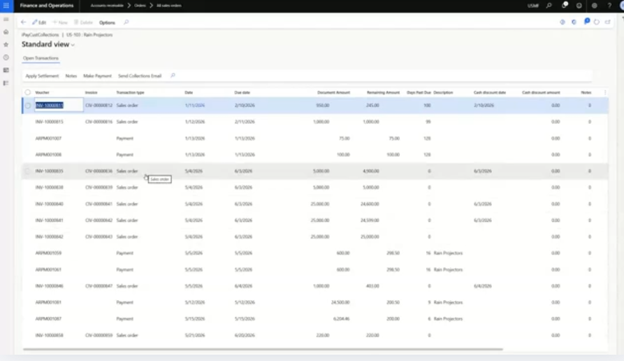
Payments also includes Collections functionality to help organizations manage outstanding receivables more effectively.
Users can view customer collection information directly from the customer record and quickly identify invoices requiring follow-up.
The Collections form allows users to:
- Review outstanding balances
- View payment history
- Manage collection activities
- Apply payments across multiple invoices
- Update settlement information
If a customer submits a payment that should be applied across several invoices, users can select the invoices, apply the payment, and update records in a single process.
This reduces manual work while improving visibility into customer account status.
Save Customer Cards and Enable Automatic Invoice Payments
For customers who make recurring purchases, iPayments allows organizations to save payment methods directly on the customer profile.
Within the Credit Card Profile window, users can designate a saved payment method for automatic payment capture.
When Auto Capture is enabled, future invoices posted for that customer are automatically paid using the designated card on file.
The system will:
- Capture payment automatically
- Create the payment transaction
- Post the payment journal
- Apply payment against the invoice
This functionality helps organizations reduce manual collection efforts, improve cash flow, and create a more convenient experience for customers.
Bring Payment Processing and AR Automation Together in Dynamics 365 Finance
iPayments brings critical payment functionality directly into Dynamics 365 Finance, empowering finance teams to collect and apply payments faster and with little to no manual effort.
Learn more and schedule a demo by reaching out to the team at iSolutions.