When was the last time you opened your mailbox, opened a bill or invoice, wrote a check for the amount due, and mailed it back? Statistics show that it likely wasn’t any time recently. According to the USPS, the overall volume of “market Dominant” mail, including transactional mail such as bills or statements, fell 46% from 2008 to 2023.
Customers still have bills to pay, and that is never going to change, but how they pay them has significantly changed from 2008 until today. Paper checks and mailed invoices transitioned to emailed invoices and online bill pay. But it didn’t stop there. Customers expect more than an email to their inbox. They expect to be able to access their open and historical invoices and customer data any time through a self-service portal.
While Business Central is the central hub for today’s businesses to manage their orders, finances, and customers, it doesn’t natively offer a Customer Portal. That’s where an add-on comes in to play, providing instant access to a customer’s account information.
Why a Customer Portal is Necessary
You’ve gotten this far without a Customer Portal – why do you need one now?
If you or other members of your finance team are spending countless hours fielding customer questions and requests for account balances or invoice reminders, or if you’re chasing late or overdue payments, a customer portal can shift those repetitive tasks away from your team and put control directly in the hands of your customers.
Faster Payments and Improved Cash Flow
Provide self-service access for your customers to find their invoices, balances, order summaries, shipment information, and more – all right when they need it without any work on your part. With options to pay right away, you’ll see more on-time payments from your customers and spend less time chasing overdue invoices.
Reduced AR Workload
Eliminate manually processing payments – whether that be paper checks, manual credit card entries, or manual ACH payments – saving your team time while improving accuracy and ensuring payments are posted correctly and on time in Business Central.
Better Customer Experience
A portal makes it easy for a customer to pay when they’re ready. It’s a modern, frictionless experience that today’s customers have come to expect from all vendors.
The biggest thing to consider is not just what you gain from a customer portal, but what you actively lose by not having one. Margins are tight, competition is fierce, and every inefficiency in your AR process quietly eats away at profitability. Without a customer portal, your team spends valuable time answering routine balance questions, resending invoices, taking payments over the phone, and manually applying transactions – time that could be spent on higher-value activities like proactive collections, forecasting, and customer relationships.
Questions to Ask When Evaluating a Customer Portal for Business Central
There are several different apps for customer portals on Microsoft AppSource today – but not all are created equal. When evaluating a portal for Dynamics 365, you’ll want to consider:
- Is the data synced in real time or on a delay?
Many portals sound great, until you find out that the only connection is through a nightly import/export of data. When data is synced with a delay, your customers don’t have up to date information and will be reaching out with questions.
The iPayments Customer Portal is integrated natively with Business Central and provides real-time information for each account. That means your customers up to the second information, and you see immediately when a payment or change has been made to the account.
- Are payments written back to Business Central automatically?
If the portal application you’re looking at requires any manual application of payments, it isn’t saving you much time. iPayments immediately applies payments directly to the invoice that was paid, and that information shows in Business Central immediately.
- What can customers view in the portal?
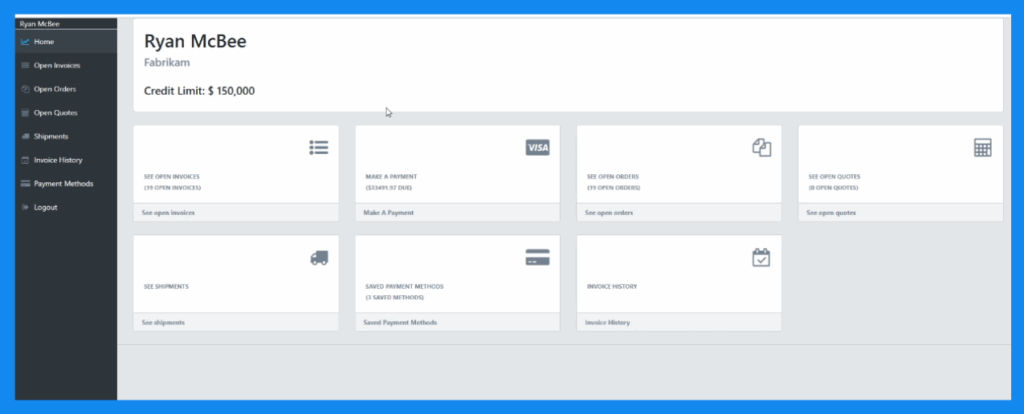
When evaluating portals that integrate with Dynamics 365 Business Central, determine what information customers can actually see through the portal and what controls you have to turn certain views on or off. Within the iPayments Customer Portal, customers have visibility to the following items, which can be toggled on or off by account through your admin settings:
- Open invoices
- Historical invoices
- Account balance
- Payment history
- Orders
- Quotes
- Shipment Details
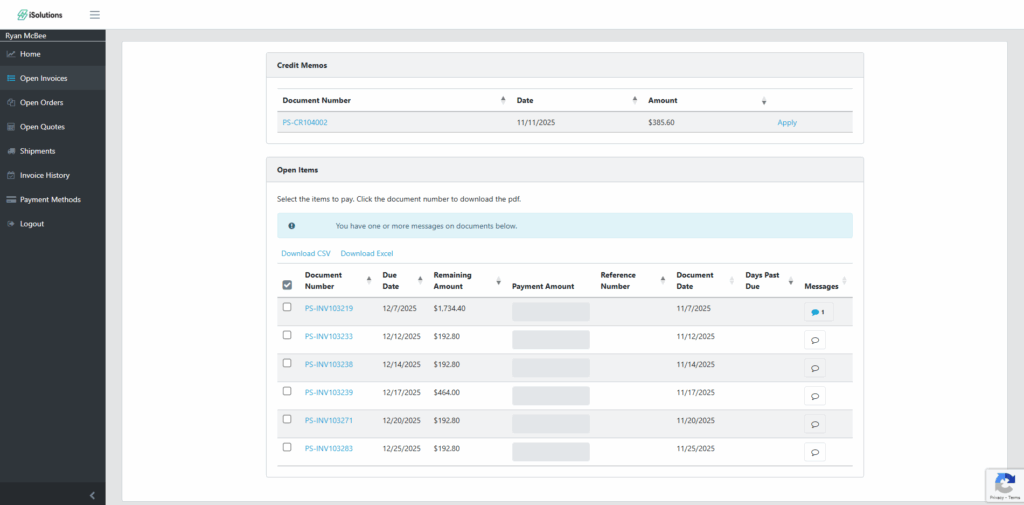
- Can customers dispute invoices or submit questions?
After they have logged into a portal, customers expect to be able to easily communicate with your team without leave the application. Within the iPayments Customer Portal, logged in users have the ability to comment on invoices through the Document Dispute function, relaying messages about their payments or account directly through Business Central to your finance team members.
- What features are in place to make the portal as user friendly as possible?
Your customers will only use a portal that is user-friendly, easy to access, and easy to navigate. With the portal from iPayments, you can invite users within your system to register, or they can self-register directly on the site. Any approved user can log in using their username and password, or can use Magic Links to request a one-time link that is sent to their verified email that they can use to log in.
- What payment methods are supported and are they secure?
When evaluating, ensure that customers payments are compliant and secure, and they are able to pay with ACH or credit card. You will also want to find out if you have the ability to absorb or pass on credit card fees, or if you can set rules based on specific customers or customer levels.
iPayments allows the customer to choose if they would like to pay by ACH or Credit Card, and you determine if you want to pass the convenience fee on to the customer or not. All payments are tokenized and PCI compliant.
- Is your app just a portal, or does it do more?
Different applications align to business needs in specific ways. Some are more focused on e-commerce needs, while others only offer base invoice/payment functionality. Evaluate your needs and that will help you determine which Customer Portal is the best for your organization.
The iPayments Customer Portal is one part of a much larger Accounts Receivable automation solution built directly for Dynamics 365 Business Central. While the portal gives customers self-service access to invoices, balances, shipments, and secure payments, it also goes beyond that to include:
- Native credit card and ACH processing inside Business Central
- Secure tokenization and stored payment methods
- Automatic payment posting back to AR
- Click to Pay links on invoices, quotes, and documents
- Convenience fee management
- Funding entries and reconciliation tools
- Advanced collections management and automated emails
- And much more
The Customer Portal is the customer-facing layer, providing your customers access to their information within your Business Central environment. Behind the scenes, everything is fully connected to your AR workflows, financial postings, and reporting in Business Central.
Signs You’re Ready for a Customer Portal
Nearly all businesses can benefit from a customer portal, but if your business checks the following boxes, a portal can have an immediate and meaningful impact on your AR operations:
- High invoice volume
- Manual payment processing
- High volume of calls or emails requesting account information
- AR bottlenecks
- Recurring late or overdue payments
AR automation is here and it is expected, not only from your customers, but also from employees and customer portals are the foundation for digital self-service finance. If you’re ready to get up and running with a Customer Portal for Dynamics 365 Business Central, reach out to the experts at iSolutions. They will answer your questions and help you understand how a portal will help your organization speed payments and reduce time spent on manual tasks.