

If you have ever wondered why your credit card payments are rejected or declined (and what the difference is) you are not alone. You put in the work to close the deal, the finance team sends over the invoice and then the credit card doesn’t go through. Getting to the bottom of a declined credit card can sometimes be more difficult than you would think. There are several reasons for a declined credit card and the fault can be on the card processor, the bank, the card account, or even your organization’s software.
In platforms like CardPointe or other payment processors, there is a distinction between a transaction being declined and one being rejected. Understanding the difference can help save you time, reduce confusion, and help you resolve issues faster.
Understanding the Difference Between a Declined v. a Rejected Credit Card
Declined
The outcome for a declined and rejected credit card are the same – the payment doesn’t make it into your bank account. However, behind the scenes there are different issues happening at different stages of the transaction process.
When a credit card transaction is indicated as declined, it means the payment was not processed. The User in your system or your Customer from your Secure Payment site will receive a message that the payment was declined.
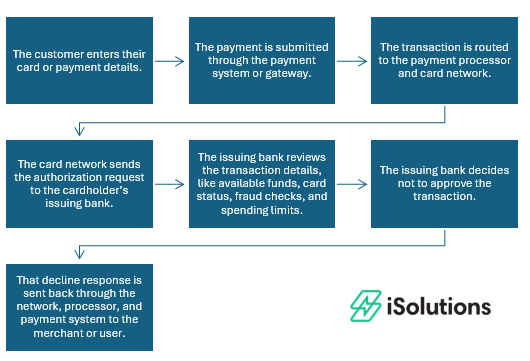
This is the most common type of failed credit card transaction and unfortunately, there is nothing you as a business can do to control if the payment is processed. Declines typically happen if there are insufficient funds, the credit limit was exceeded, there are fraud or risk concerns, or card details – such as the expiration date or zip code – are incorrect.
In these cases the customer should contact their bank or try a different payment method such as an alternate card or an ACH transaction, both of which can be processed through iPayments.
If the payment is declined but the card is fine, the payment can be retried and process the next time.
If you’re using iPayments for Business Central, a decline will not create a Cash Receipt.
Rejected
Rejected credit card transactions happen after the initial payment has been approved. This results in a Cash Receipt being written and a payment being applied to the document in Business Central. Once you receive notification of the Rejection, a User will need to reverse the payment to reopen the document and contact the Customer to collect payment.
Top Reasons Credit Card Payments are Rejected
When it is time to fund the transaction to your bank, the Processor stops the transaction before it hits the bank, reasons can include:
- AVS mismatch where the billing address doesn’t match
- CVV mismatch
- Velocity limits due to too many transactions, too large of an amount, ACH caps
- Fraud filters / risk rules
- Blocked card types or payment methods
- Account configuration restrictions
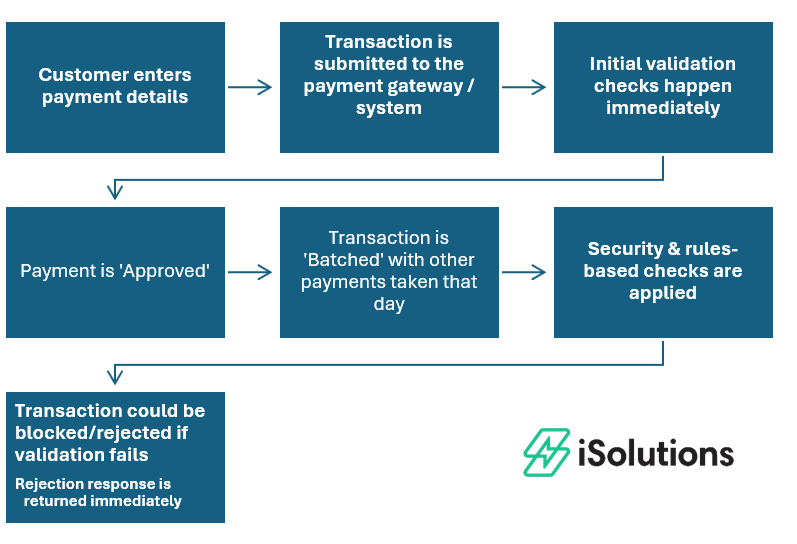
If a payment is rejected you’ll want to review your system settings, transaction limits, or data entry to identify the cause.
Declined vs Rejected Credit Card Transactions
| Type | Where it Fails | Who Controls It | Common Causes | What to Do |
| Declined | Issuing Bank | Customer/Bank | Insufficient funds, fraud, limits | Customer contacts bank or uses alternate payment method |
| Rejected | Payment Processor | Gateway settings, processor (CardPointe/Fiserv) or Merchant | Invalid data, missing fields, fraud filters,, configuration, or setup issues. | Review error message, check settings/configuration, correct data, retry transaction
Reverse payment in Business Central |
How to Fix a Rejected Credit Card Payment
- Start with the easiest answers first.
- Are the routing and account numbers valid for ACH transactions?
- Is the billing address correct?
- Is the zip code correct?
- Do you have the right CVV and card details?
- Then you’ll want to investigate any transaction limits or ACH caps. Many processors will limit the total transaction based on historical trends to mitigate any fraud. When this happens, you’ll need to provide additional statements to prove the need for an increase.
- Check fraud or filter settings. If you are using CardPointe/Fiserv as your processor through iPayments, you’ll need to open a support ticket in order to check these settings.
How Businesses Can Reduce Rejected Payments
- Be proactive when your business changes. If you are anticipating larger sales volumes or higher charge amounts, reach out to your merchant processor to let them know and start the applicable paperwork. If you work with iSolutions, you can log a support ticket and the support team will help you move this forward.
- Set realistic transaction limits from the start.
- Ensure accurate data capture. Saving Payment Profiles can help with this. iPayments uses tokenization to securely save credit card information on your customer’s account. This means the actual credit card data is not stored in your system, but you or your customer can apply payment from a previously used card on any open invoice or sales order.
Frequently Asked Questions
-
Why is my credit card payment being rejected?
A credit card payment is typically rejected because it fails validation or security checks. Common reasons include incorrect billing address (AVS mismatch), missing or invalid payment data, transaction limits, fraud and risk rules set by the payment system or processor.
-
What is the difference between declined and rejected transactions?
A declined transaction is sent to the cardholder’s bank, and the bank chooses not to approve it. A rejected transaction is first approved, by the payment gateway processor and never reaches the bank.
-
Can a declined payment be retried?
Yes, declined payments can usually be retried immediately once the issue is corrected. For example, the customer can re-enter accurate billing information, provide the correct CVV, or use a different payment method if needed.
-
Does a rejected transaction charge the customer?
No, a rejected transaction does not charge the customer. Because the payment is stopped before reaching the bank, no authorization or hold is placed on the card.
-
Is a rejected transaction a fraud issue?
Not always. While some rejected transactions are triggered by fraud or risk rules, many are caused by simple issues like incorrect data entry, validation errors, or system configuration settings. It does not necessarily mean the transaction is fraudulent.
If you are frequently experiencing credit card declines or rejects with your current processor, there may be a deeper issue at hand. Feel free to reach out to the team at iSolutions and we can help identify any potential underlying issues and help you navigate a smoother path forward.