
Managing payments across multiple parent/child entities in Business Central can get complicated fast. Without a true out-of-the-box way to manage these hierarchies, it’s difficult to clearly understand relationships between organizations or apply payments across multiple entities.
What is National Accounts in Microsoft Dynamics 365 Business Central?
On paper the structure makes sense – a parent company oversees multiple subsidiaries or locations. Invoices are generated at the child or parent level, but payments can often come from the parent. It seems simple enough until you have to apply that payment to one or multiple child accounts.
Soon enough the AR team is piecing together relationships, bouncing between different screens and records, and attempting to manually apply payments one invoice at a time. This series of disconnected steps can quickly lead to errors and inefficiencies, not because of your team members, but because of the gap in workflow.
How to Manage Parent-Child Accounts in Business Central
The National Accounts app from iSolutions Payments is built to fit the gap in Business Central and allow you to tie parent and child entities together in a way that simplifies payments across them.
And the latest release of the app includes even more powerful functionality – the ability to launch the iPayments pay screens directly from the National Accounts payment registration window. It may sound like a small change, but it has a huge impact.
Before this update, applying payments across child accounts was still a separate, manual step. The BC user would identify what needed to happen and then leave that workflow to actually process and apply the payment. Now that gap is gone.
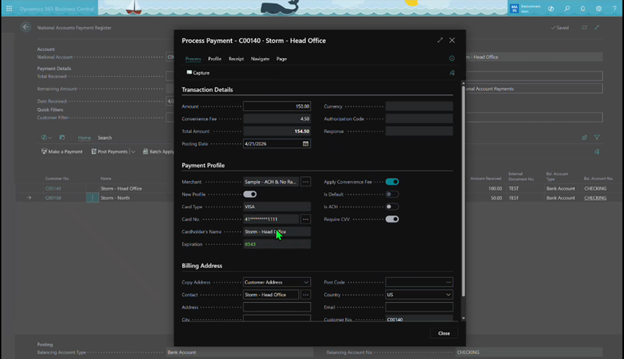
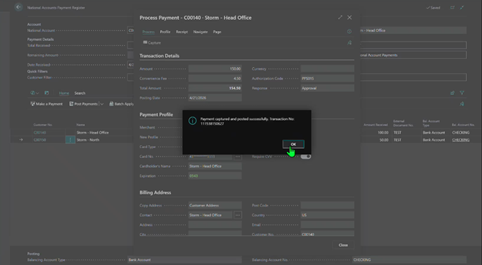
When the user is in the Payment Registration window, the payment can be applied immediately without switching screens or re-entering any information.
How the National Accounts Payment Process Works in Business Central
Consider a distributor selling to a national retail chain. Each store is set up as its own customer in Business Central. Orders, shipments, and invoices are all handled at that level, but the payments come from corporate. At the end of the month a single payment is made that needs to be applied across multiple invoices tied to different store locations.
Using National Accounts and iPayments for Business Central, your team can now open the National Accounts Payment Registration window and see the full hierarchy of parent and child accounts, including open invoices across those accounts.
The payment can be processed and applied across multiple accounts and invoices.
Benefits of Using National Accounts in Business Central
National Accounts for Business Central allows you to navigate the complexity of parent/child relationships in a simple way – all directly within Business Central. This helps payments to flow smoothly through the system and eliminates confusion.
- Your team moves faster because they’re not navigating around the system
- Errors decrease because there are fewer handoffs and touchpoints
- Visibility improves because everything is happening in one place
- Cash gets applied quicker, without delays or confusion
If you’re using Microsoft Dynamics 365 Business Central to run your business and work with customers that have hierarchies or split invoices, National Accounts and iPayments help you handle payments in a way that actually aligns with how your system operates.
By bringing payments directly into the same workflow where you’re managing account relationships, everything stays connected—making the process more controlled, more accurate, and far more efficient.
Products from iSolutions to Fill the Gap
These two apps are required to make the above process work:
National Accounts
With National Accounts from iSolutions, you can easily define parent-child relationships between customers, allowing you to accept one payment and apply it across multiple accounts.
$250/month
iPayments Basic
iPayments is a fully embedded payment processing and accounts receivable automation solution built directly inside Microsoft Dynamics 365 Business Central, enabling businesses to accept payments, automate collections, and manage the entire AR lifecycle in real time without leaving their ERP.
$350/month
Customer Portal also available
Reach out to the iSolutions team to schedule a demo and learn how this would work in your BC environment.