

iSolutions continues to expand the capabilities of iPayments for Microsoft Dynamics 365 Business Central with new updates designed to make payment processing and accounts receivable management more efficient inside the ERP.
Many of these improvements are driven directly by feedback from every day users. Working closely with the businesses using iPayments every day, the iSolutions development team uses their input to guide the enhancements to the product.
The latest updates focus on improving day-to-day usability – making it easier for finance teams to access payment tools, review transaction details, and manage customer payment activity directly within Business Central.
Here are five recent iPayments enhancements that Business Central users are already finding helpful.
1. Faster Access to Key Payment Tools
As iPayments has expanded to include more accounts receivable and payment automation capabilities, having quick access to those tools has become increasingly important.
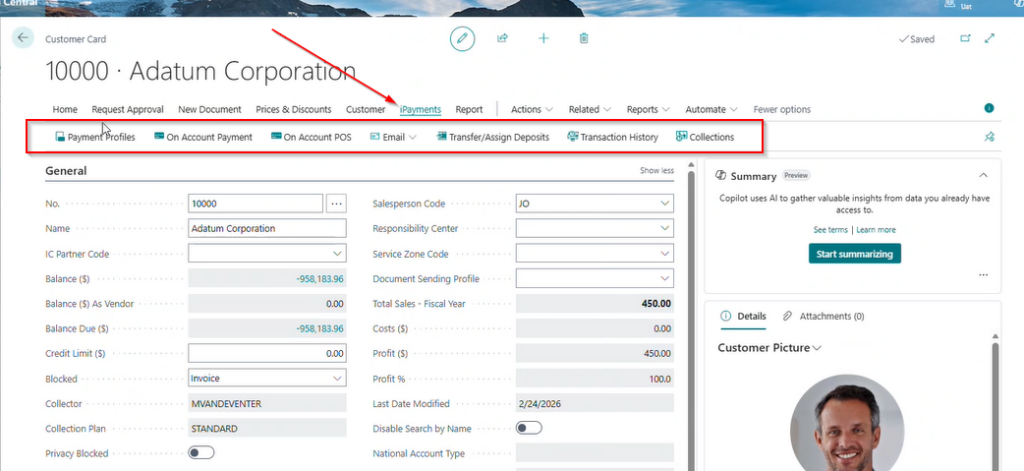
The latest update introduces a more streamlined iPayments menu within the Customer Card, bringing commonly used actions into one organized location.
Instead of navigating through multiple menus, finance teams can now move directly to the actions they need while working inside the customer record.
2. Easier Management of Stored Payment Methods
For organizations that process repeat payments or recurring transactions, managing stored payment methods efficiently is critical.
With this update, customer payment profiles are now easier to access and manage directly from the iPayments section of the Customer Card.
Users can quickly view, add, or update payment profiles and use saved payment methods when processing transactions.
Additional improvements to the payment profile experience include:
-
Address details now displayed directly on the profile card
-
Visibility into recent gateway synchronization activity
-
The ability to initiate a real-time sync with the payment gateway when needed
These updates reduce the number of steps required to manage customer payment information and keep payment data better organized.
3. Accept and Apply Payments More Quickly
Another update improves how teams record payments directly against customer accounts.
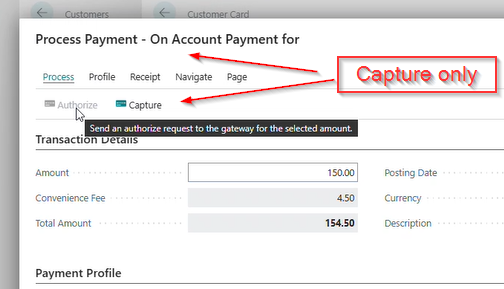
New On-Account Payment and On-Account POS options allow users to process payments directly from the customer record, reducing the need to open additional transaction screens.
With these tools, users can:
-
Accept payments and apply them to a customer account
-
Record point-of-sale payments when needed
-
Apply funds toward open balances more efficiently
By bringing payment acceptance closer to the customer record, these improvements help teams handle transactions faster and with fewer steps.
4. Clearer Visibility Into Payment Activity
When customers have questions about payments, finance teams need fast access to accurate transaction details.
The updated payment transaction history experience provides expanded filtering and deeper insight into transaction activity.
Users can now easily review:
-
Authorizations
-
Captures
-
Refunds
-
Voids
Detailed transaction information is also available, including approval data, payment amounts, merchant information, and convenience fee details.
In addition, refunds or voids can now be processed directly from the transaction history or transaction detail screens, making it easier to resolve payment issues quickly.
When transaction history is opened from a record such as a Customer Card or Sales Order, the system automatically filters results to show the relevant transactions, saving time during research and troubleshooting.
5. Simpler Deposit and Collections Management
Managing deposits and following up on outstanding balances are important parts of the accounts receivable process.
The latest enhancements make it easier for teams to access deposit assignment tools and collections workflows directly from the iPayments menu.
Finance teams can now quickly:
-
Transfer or assign deposits between records
-
Apply funds to invoices or customer accounts
-
Review outstanding balances
-
Take action on overdue invoices
Keeping these capabilities embedded within the iPayments interface helps AR teams stay focused on managing receivables without switching between multiple areas of the system.
Built to Work Naturally Inside Business Central
Because iPayments is built natively inside Microsoft Dynamics 365 Business Central, these updates integrate directly into the way finance teams already work.
By bringing payment processing, transaction visibility, deposit management, and collections tools closer to the customer record, these enhancements help organizations:
-
Reduce unnecessary navigation between screens
-
Speed up payment processing
-
Improve insight into payment activity
-
Simplify accounts receivable workflows
As iSolutions continues to expand iPayments, the goal remains the same: helping Business Central users manage payments and AR processes more efficiently inside the ERP they already rely on.
Read a full breakdown of everything included in the March 2026 Release here.
Not using iPayments yet? Get started today.