

Business credit cards continue to be a go-to for company expenses. In fact, VISA reports that 79% of small businesses use at least one business credit card for day-to-day operations while mid-sized companies can have multiple credit card holders by department or role, with checks and balances in place to monitor spend and budgets.
Business Credit Cards and the Rising Cost of Convenience
While credit cards continue to climb in use, so does the cost of convenience. With record levels of credit card fees, businesses are looking for ways to reduce their costs while still allowing customers to pay by card. More companies are using convenience fees to pass along the credit card fee to their customers, offsetting processing costs incurred.
Convenience Fees vs. Credit Card Surcharging: What’s the Difference?
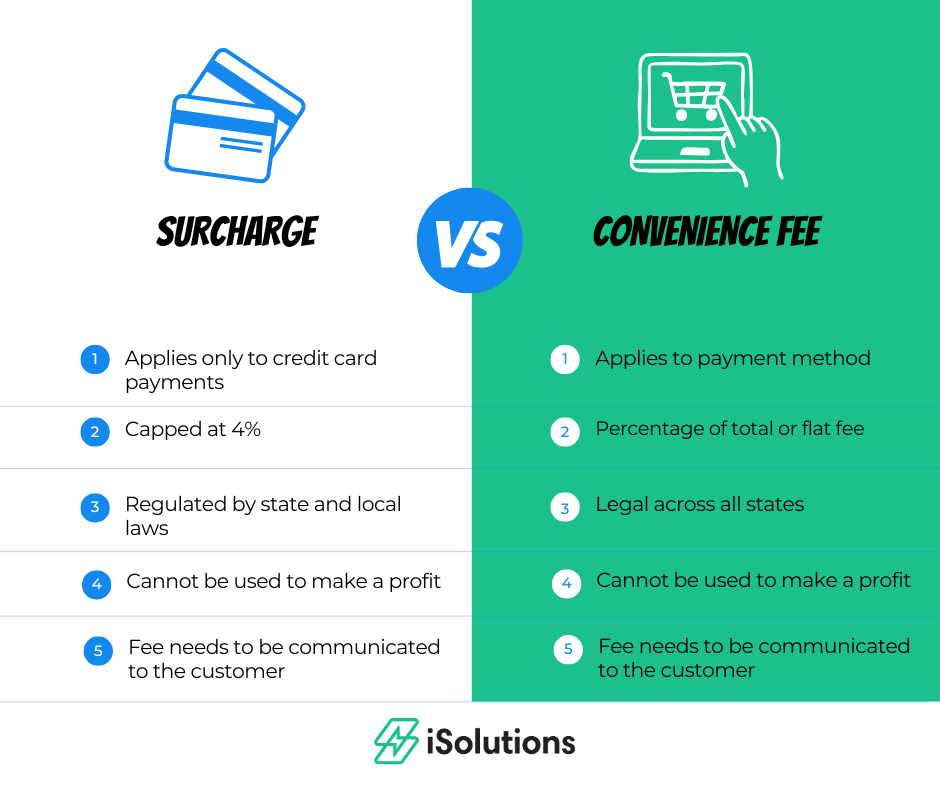
Convenience fees and surcharging fees differ greatly, with separate regulations and rules related to each.
Credit Card Surcharging Rules and Compliance Considerations
Surcharges only apply to credit card payments and are typically capped at a specific percentage to cover the cost of processing the payment. Credit card surcharges must follow state and federal laws and guidelines to remain in compliance.
Important Surcharging Rules
- Surcharge rates are capped at 4%, with VISA capping at 3% of the total transaction.
- Surcharging cannot be used to make a profit, only to cover the credit card fee
- Debit cards are not charged a fee, so they are not applicable to surcharge fees
- Customers need to be informed of the fee and it needs to be listed on the invoice
There are states that do not allow credit card surcharging. State laws can change frequently so you should check with your specific state for the most up to date information on surcharge laws in your area. Because surcharge rules vary by state and card brand, incorrect setup or poor disclosure can expose businesses to compliance issues. Many organizations look for tools that help enforce rules automatically rather than relying on manual processes.
What Are Convenience Fees and When Can They Be Applied?
Companies can add convenience fees when a customer uses a specific payment method such as paying online. For example, a company may charge a fee to pay an invoice online, but that fee is waived if paid in person. Generally, convenience fees are common for credit card payments while other payments, such as ACH or wire, do not apply the convenience fee.
Typically convenience fees are a flat fee or a flat percentage of the payment. These fees are legal across all states, but do require disclosure of the fee.
Convenience Fees for Accepting Credit Cards in Dynamics 365 Business Central
Business Central out of the box does not allow you to accepting credit card payments. For those companies accepting credit card payments, they are applied through a manual process. Manual credit card processing not only adds internal workload, it can also create delays, limit payment options, and introduce inconsistencies in how fees are applied or disclosed to customers.
iPayments from iSolutions is an add-on app for Business Central that provides click to pay links where customers can pay online via credit card or ACH.
Convenience fees for using a credit card to pay online are applied by customer at a percentage of the total invoice or at a flat fee and shows on the invoice and the payment window. Payments made by ACH are not assessed a convenience fee.
You can choose to charge a convenience fee to all customers, some customers, or no customers. When disclosed clearly and applied consistently, many customers view convenience fees as a fair tradeoff for the speed and ease of paying online—especially when lower-cost options like ACH remain available.
Common Questions About Convenience Fees
Are convenience fees and surcharges the same thing?
While often used interchangeably, there are key differences between convenience fees and surcharging. Mislabeling fees can create confusion on the compliance level and with your customers.
While surcharges are tied directly to the cost of accepting a credit card and are regulated at the state and card-brand level, convenience fees are associated with the payment channel itself and apply when customers choose a specific method of payment.
Can convenience fees only be charged on credit card payments?
Convenience fees are associated with HOW a customer chooses to pay and not the credit card itself. They are most commonly applied to online credit card payments while lower-cost options like ACH often do not include a convenience fee.
iPayments supports convenience charges for credit cards but not ACH payments.
Are convenience fees legal?
Convenience fees are permitted across all states, provided the fee is clearly disclosed to the customer before payment is made. Businesses should also follow card brand and payment processor guidelines to remain compliant.
Are convenience fees meant to generate revenue?
No, they are used to offset the cost of payment processing. They are not intended to generate revenue.
Will customers push back on convenience fees?
Customers are generally used to paying convenience fees in both their personal and professional lives when making payments online. Offering fee-free alternatives such as ACH payments helps customers understand they do have a different option available to them.
Baden Sports received positive feedback from customers, noting that they were more than willing to pay the fee because the payment process actually was convenient for them.
How do I manage convenience fees in Dynamics 365 Business Central?
Dynamics 365 Business Central does not allow you to apply convenience fees out of the box. With iPayments for BC, you can apply convenience fees to any online credit card payment. Settings within the solution allow you to choose who those fees are applied to – all customers, some customers, or no customers.
Questions to Ask Your Payment Provider about Convenience Fees
Not all payment providers handle convenience fees the same way. Before enabling fees it is important to understand how your provider supports fee application and disclosure.
How much should our convenience fees be? Can they be applied as a flat amount or a percentage?
iPayments allows you to set a percentage-based fee of up to 3% to credit card payments accepted through click to pay links or the customer portal. You also have the ability to add a flat fee. This fee does not apply to ACH payments, giving customers a fee-free option, even when paying online.
How are fees displayed to customers before the payment is submitted?
With iPayments for Business Central, customers see the convenience fee clearly displayed before payment is finalized. The invoice amount, fee, and total payment is in the payment window and in confirmation statements.
What other options do customers have to pay without a fee?
iPayments allows customers to pay a credit card with a fee, or ACH at no charge. This gives customers a choice while helping finance teams manage processing costs.
Are convenience fees automatically calculated and posted to the correct accounts?
Within iPayments they are automatically calculated at time of payment and posted correctly within Business Central. There is no manual fee calculation, no separate reconciliation process, and no risk of inconsistent application across customers or invoices.
How are fees set up within Dynamics 365 Business Central?
Fees are configured within the iPayments app and tied directly to Business Central. Fees can be enabled based on your business rules. Setup does not require any custom development or disconnected systems.
What level of support is available if we have questions?
iSolutions has a dedicated support team that provides same-day assistance at no cost for iPayments users.
Using Convenience Fees as a Cost-Control Strategy for Finance Teams
With rising interchange fees from credit card companies and tighter margins, finance teams are under pressure. Applying convenience fees to online credit card payments should be seen as a business strategy to help cover the cost of doing business and providing an easier, faster way for customers to pay. For Dynamics 365 Business Central users, iPayments provides a way to accept credit cards with convenience fees that are transparent, consistent, and easy to manage.
If you have questions or would like additional information, reach out to the team at iSolutions.