

The latest iPayments release brings expanded currency handling, more flexibility for MEM configurations, and improvements to everyday payment processing in Dynamics 365 Business Central. From applying scheduled payments to processing partial refunds, these updates address the details that help accounts receivable teams keep payments moving and records accurate.
Here’s a look at what’s changing and what it means for your business.
Expanded Multi-Currency Payment Support in Business Central
For businesses accepting payments in more than one currency, this release carries transaction currency through payment processing and Business Central posting, with additional visibility in transaction history.
Transaction history now records:
- Transaction currency and transaction amount.
- The amount in local currency.
- The convenience fee in both transaction currency and local currency.
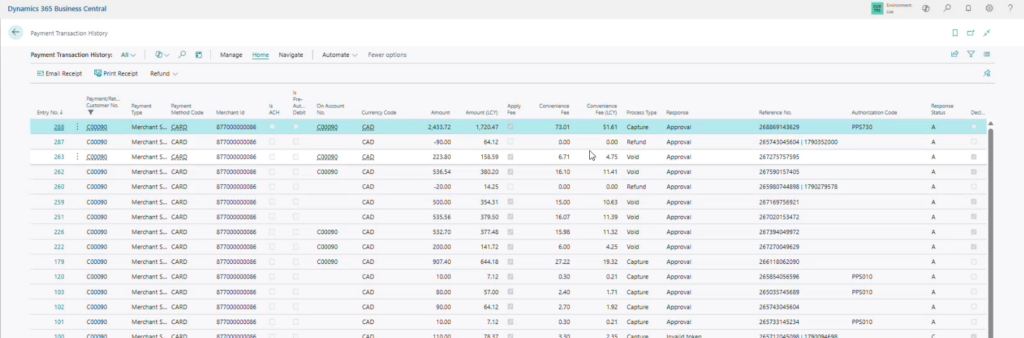
New fields include currency code and amount (LCY)
For foreign-currency payments, general ledger posting uses the local-currency amount, while customer entries retain the customer transaction currency. This gives your team a clearer view of the original payment and the amount used for accounting.
Merchant Selection Matches the Payment Currency
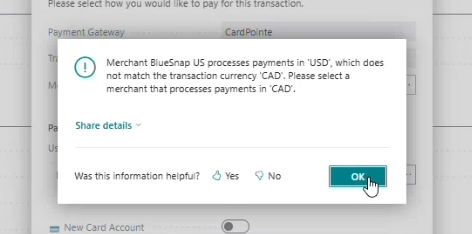
When processing a payment, iPayments shows the transaction currency and the specific merchant that aligns. For example, a CAD payment requires a merchant configured to process CAD. If the selected merchant processes USD, a validation message directs the user to choose a merchant that processes CAD.
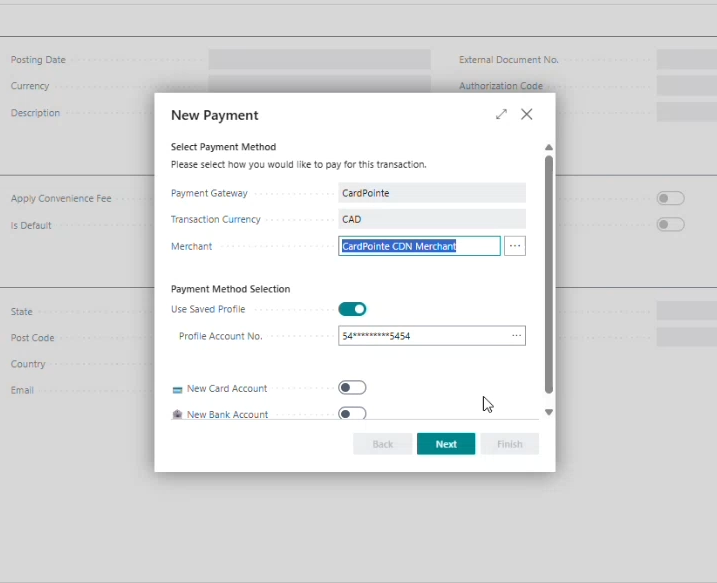
If you try and select a merchant that does not accept the transaction currency, it will prompt you to choose the correct merchant for the currency.
What to Know About Payment Links for Multi Currency
Payment link creation does not currently block selection of a merchant with a different currency. The recipient must have access to the relevant merchant, and Business Central’s standard rules determine whether a payment in one currency can be applied to an invoice in another.
If you accept multiple currencies, review your merchant configuration and payment link workflows with the iSolutions team.
Ability to Import Sales Documents and Enable AutoPay
Automatic charging now works when externally imported sales orders are posted, provided the payment method code meets the configured condition and a default card is available.
This update supports businesses that bring orders into Business Central through integrations and rely on automatic payment processing when those orders are posted.
This feature was developed thanks to a user request.
New Developer Events and Hooks for Payment Automation
New programmatic events and hooks give developers additional ways to connect payment processing with business workflows. These capabilities support:
- Capturing payments programmatically.
- Processing refunds programmatically.
- Retrieving default credit card profiles.
Profile queries can use customer, merchant, and contact information, and payment processing can run from supplied parameters without requiring user interaction with a payment page.

Ability to Set Default Profiles for Customers, Merchants, Contacts, and combinations of each
More Flexible MEM Configuration
The Multi-Entity Management (MEM) side package from iSolutions is no longer mandatory for Customers that also have Binary Stream Multi Entity Management installed. Existing customers with the MEM side package can continue using it, including their existing customized installations.
When the side package is absent or removed, the Merchant dimensions matrix supports multiple merchant-dimension combinations, giving businesses more flexibility than a one-to-one merchant / dimension combination relationship.
Convenience fee dimensions can also be configured to use:
- Salesperson dimensions. (default)
- Dimensions from the payment document.
- A fixed alternate dimension.
- Customer-based dimensions.

These options help businesses align payment and fee posting with their dimension structure. This is applicable on a global level.
Updates to Enhance the User Experience
More Reliable Funding and Scheduled Payment Application
Two fixes address posting and payment application for MEM related workflows.
MEM Posting Compatibility
With a recent MEM enhancement, Customers were experiencing ‘CONSISTENT’ errors on posting payments and funding entries through iPayments. We have now catered to the changes introduced to allow for base BC and MEM posting.
MEM Auto Pay
AutoPay processing now correctly applies payments scheduled by due date or document date to the intended documents for MEM customers. This addresses situations where scheduled payments did not apply as expected.
Multiple Partial Refunds for BlueSnap Payments
Previously, after a refund was processed against a BlueSnap payment, additional refunds could be blocked, even when part of the original payment remained available to refund.
This release allows multiple partial refunds until the combined refund amount reaches the original payment amount. That gives your team more flexibility when a customer needs separate refunds for different items or adjustments.
The settlement status returned by BlueSnap may continue to show the payment as refunded after the first refund. The corrected processing allows additional eligible refunds within the original payment limit.
New Card Entry Follows Merchant CVV Settings
The new card flow within Payment Profiles now follows the merchant’s CVV configuration.
Previously, this flow required a CVV even when the merchant was configured with “CVV not required”. The correction aligns card entry with the merchant setting.

Watch as Members of the iSolutions Team Discuss the Update

Watch Marcel, Sabrina, Elissa, and Ryan as they discuss the October Update.
Questions About the Release?
Whether you’re accepting payments in multiple currencies, using MEM, importing sales orders, or building payment automation, the iSolutions team can help you understand how these updates apply to your setup.
Contact iSolutions to review the updates and get help with your iPayments configuration.